
Tynkr
Inkpress
Turn your manuscript into an EPUB 3 ebook, a print PDF at KDP paperback trim sizes and a web page for your author site. Choose a clean, styled or framed look, check it in a live page preview, and keep your work on your own PC.
See it.
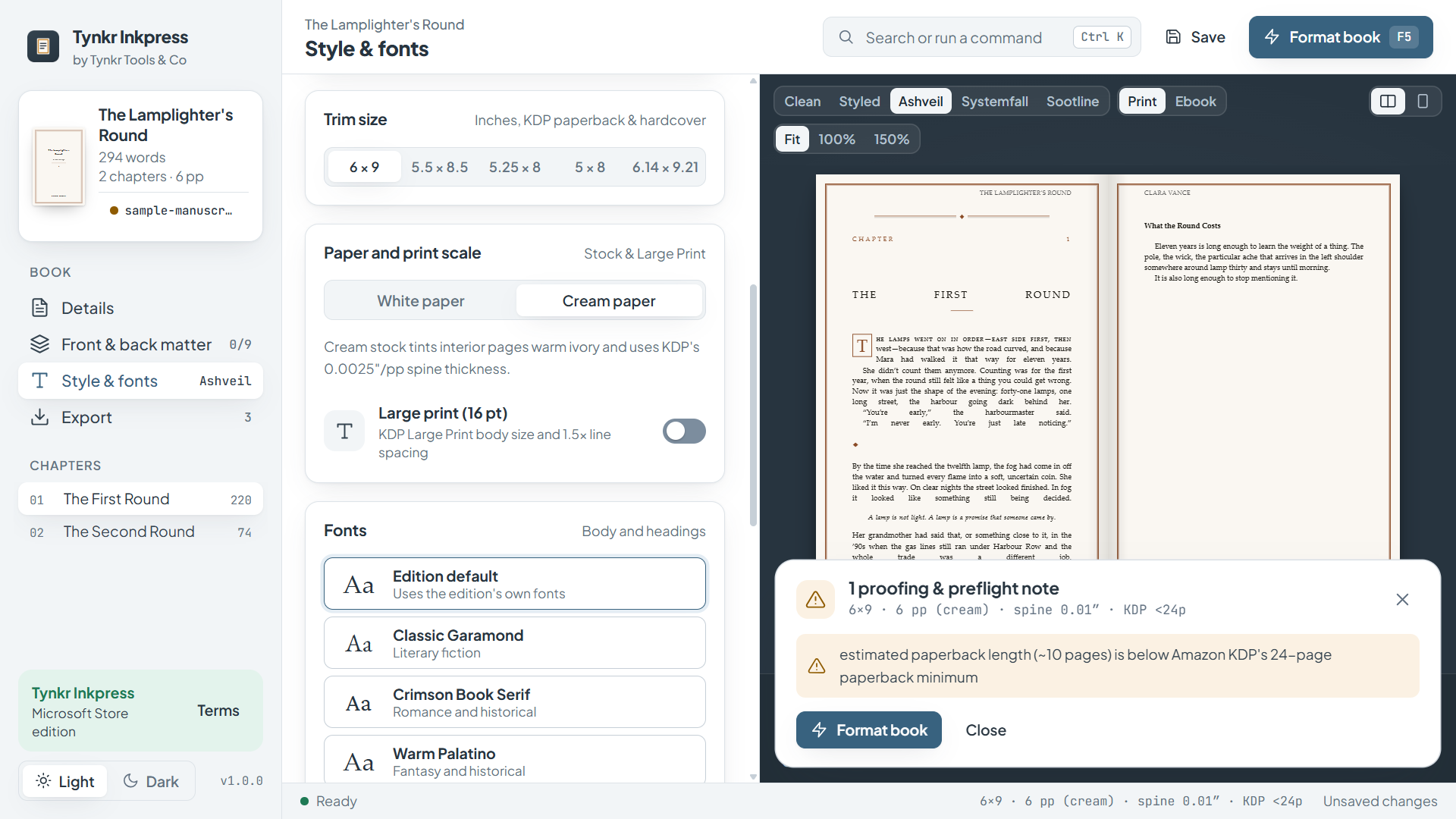
ScreenshotsReal screens from Tynkr Inkpress. Select any one to see it full size.
What it does.
FeaturesManuscript to publish-ready files
Open a Word (.docx or .doc), Google Docs (.odt or .docx download), PDF, Markdown or plain-text file — your original file is never modified, and Inkpress reloads it when you save in your usual editor. Press Format book (F5) to build an EPUB 3 ebook, a print interior (HTML and PDF), an author-site web page with search and social metadata (or borrow your site’s navigation, footer and stylesheets), and a delivery ZIP with every built file plus DELIVERY-NOTES.txt.
Choose a look
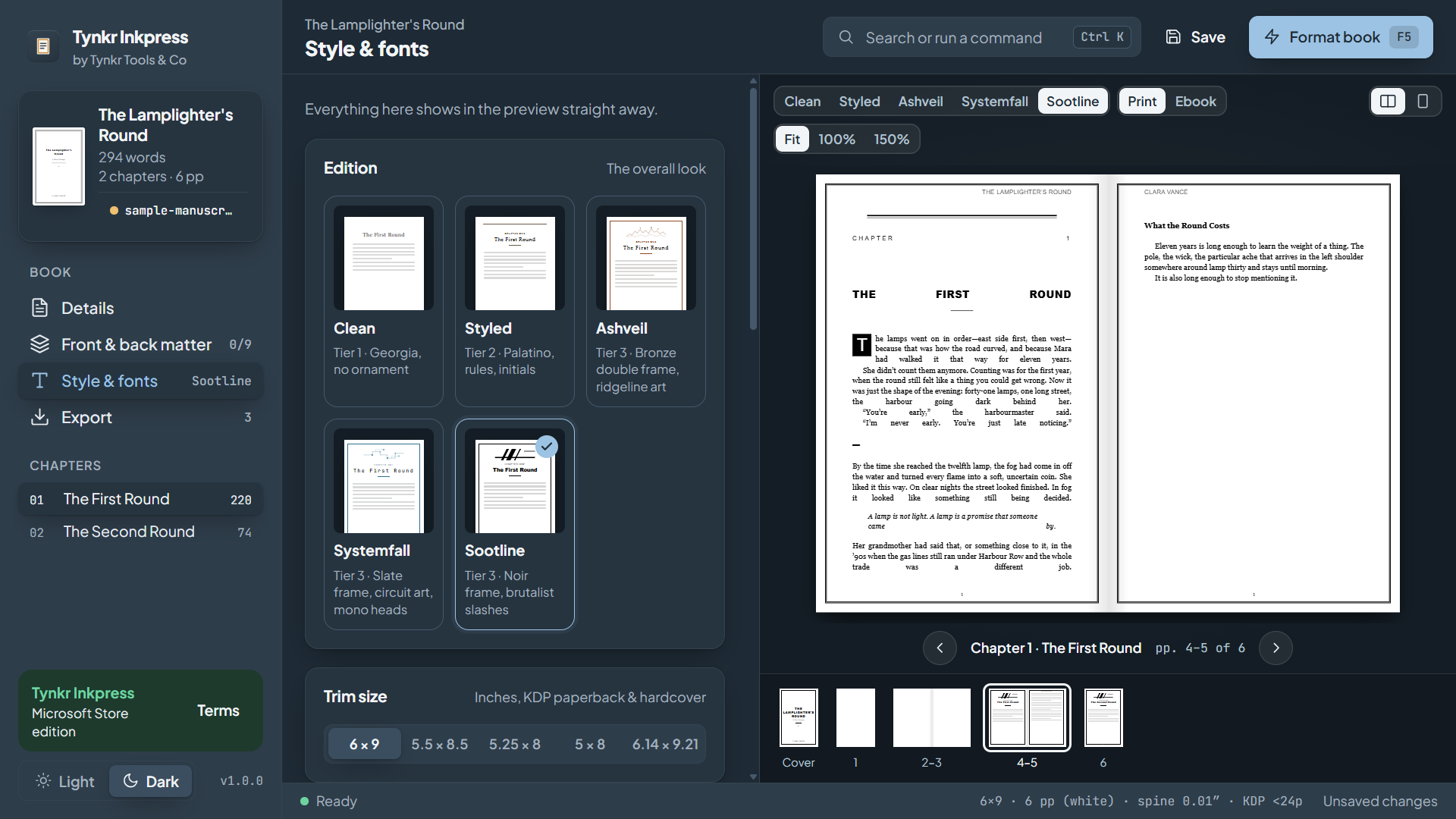
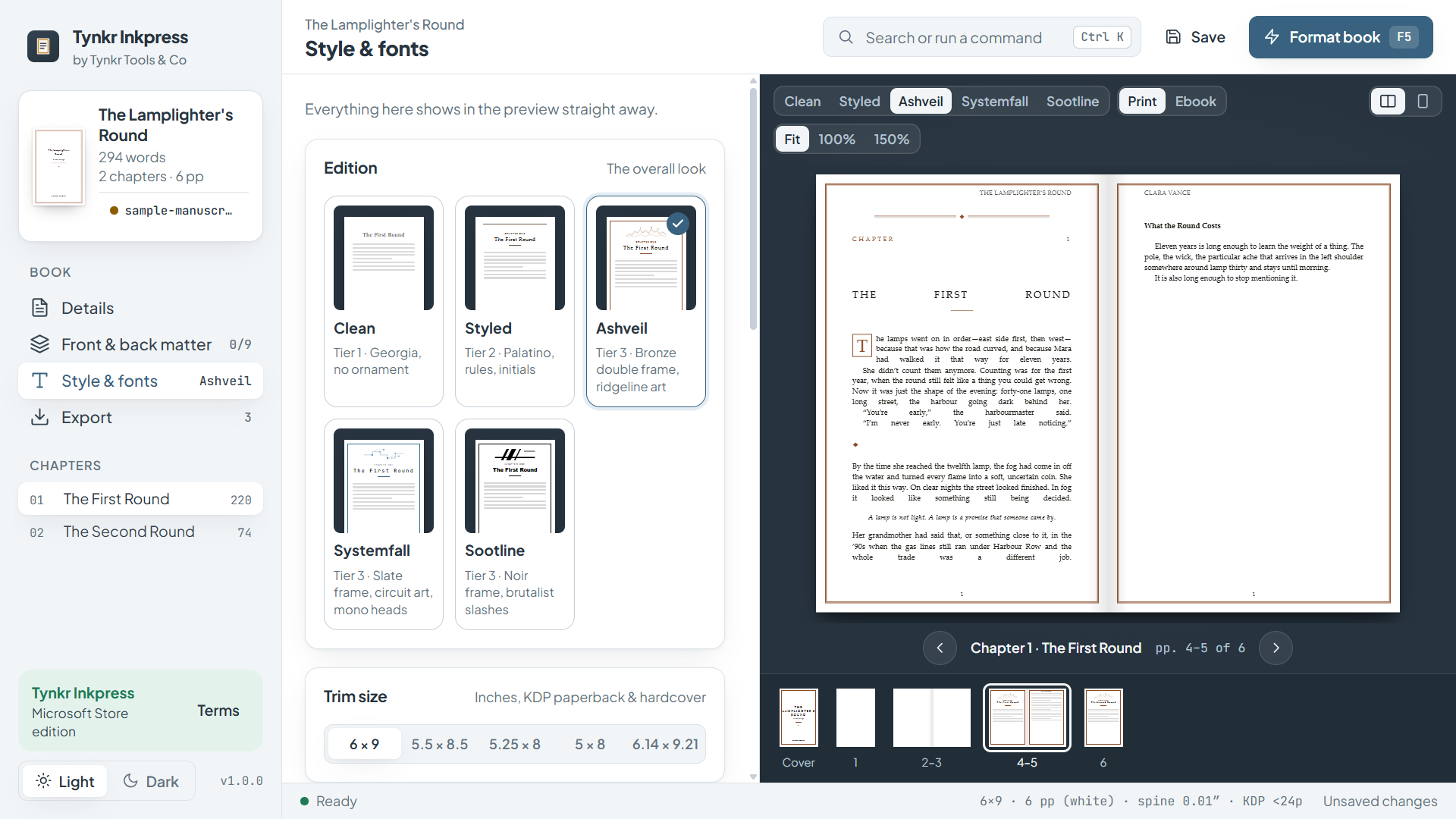
Start with Clean (house typography, plain headings) or Styled (drop caps, chapter numbers, rules and ornamental scene breaks), or pick one of three framed editions: Ashveil (warm bronze double frame, classic serif), Systemfall (slate-blue geometric frame, monospace headings) or Sootline (high-contrast noir frame, heavy grotesk headings). Framed editions add a vector (SVG) ornamental rule at each chapter opening, a bordered page frame and a typographic scene break — no stock or generated illustrations. Fine-tune page borders, accent colors, drop caps and six font pairings (pairings with bundled open-license fonts embed them in your EPUB).
Live print and ebook previews
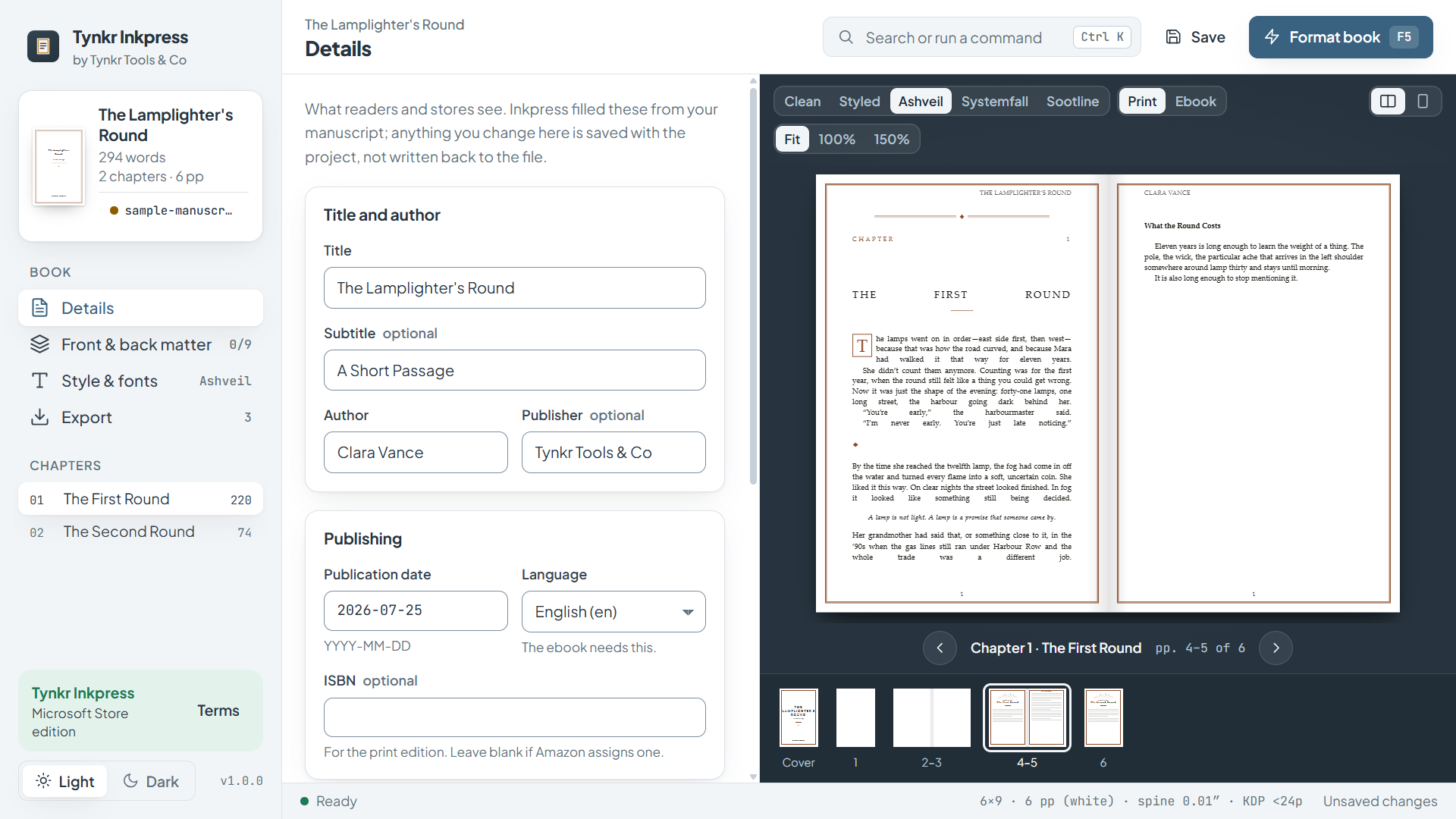
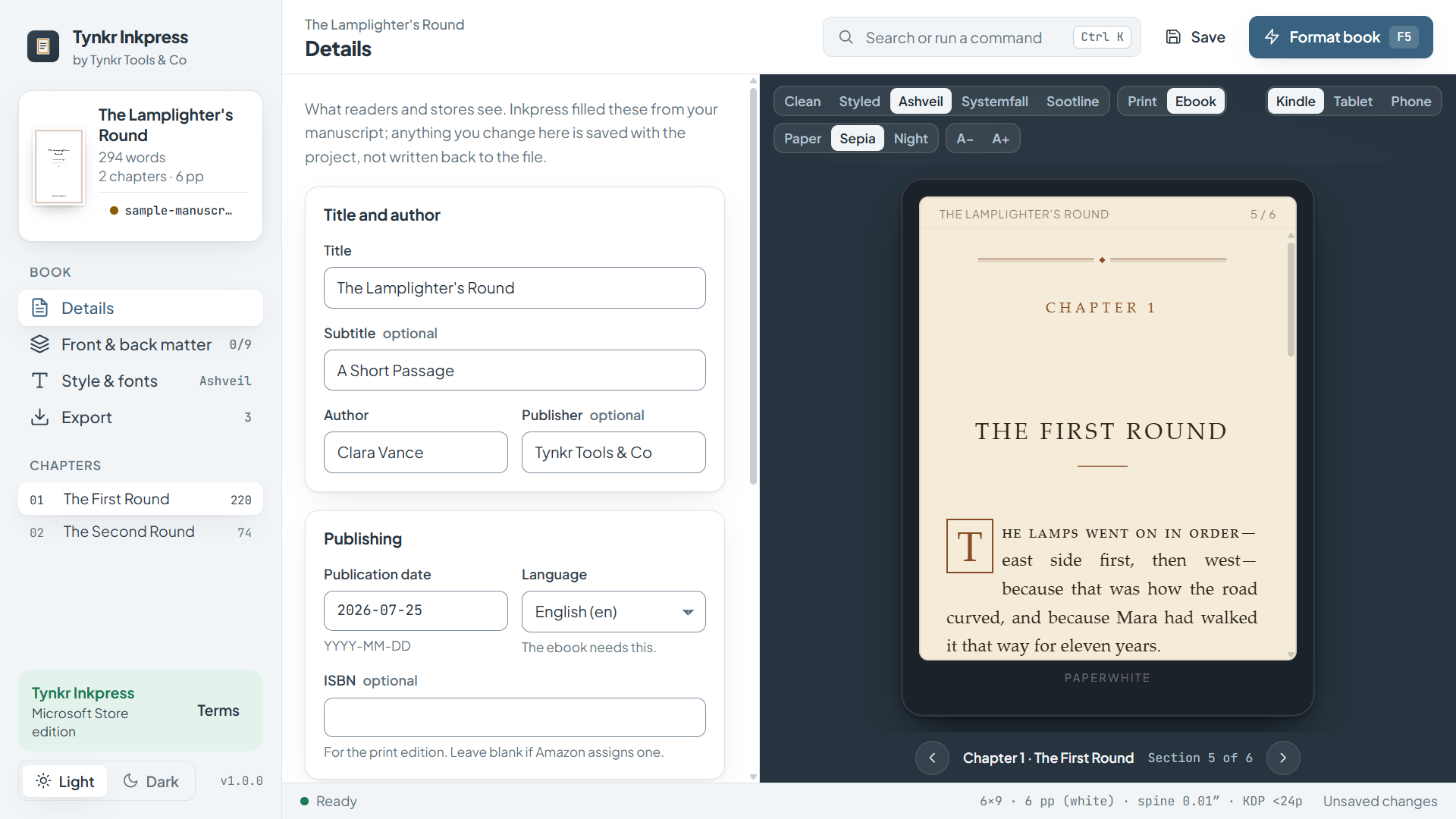
Check paginated print spreads live as you change settings, or switch to the ebook view at e-reader, tablet and phone sizes with paper, sepia and night screens. Drag and drop a manuscript, cover image or output folder onto the window, explore the built-in sample story first, switch between light and dark themes (the first launch matches Windows), and work fast with the command palette (Ctrl+K) and Format book (F5).
Print for KDP paperbacks
Format for KDP trim sizes — 6 × 9, 5.5 × 8.5, 5.25 × 8, 5 × 8 and 6.14 × 9.21 inches — with white or cream paper stock and a 16 pt large-print layout. Estimated page count, spine width and inside gutter update while you work. Print PDF export uses Microsoft Edge, which comes with Windows, or Google Chrome; always check the final PDF in KDP’s own previewer before you publish.
Every part of the finished book
Fill in dedication, epigraph, copyright page, content note, an “also by” list, acknowledgments, about the author, a newsletter sign-up link and a teaser for your next book. Build a typographic ebook cover generated from your title and author, or add your own JPG, PNG or SVG cover.
Catch problems before you upload
Preflight checks flag missing book details, very small cover images, low-resolution or missing interior images, repeated words such as “the the”, leftover TODO and TK notes, duplicate chapter titles, and books estimated to fall below KDP’s 24-page paperback minimum. Click a chapter warning to jump straight to that chapter.
How your data lives.
Stay on your PCTynkr Inkpress sends us nothing. There is no account, no telemetry and no analytics — your manuscripts, book settings and exports stay on your PC, and Inkpress never modifies your manuscript file.
Preferences, your recent-books list, the sample book and default exports live in Documents\Tynkr Inkpress. Each book’s settings are saved in a .inkpress.json file next to its manuscript when you save. These are ordinary files protected by your Windows account; Inkpress does not encrypt them, and uninstalling Inkpress does not remove them.
The app’s own code makes no network connections, with one exception: when you make a print PDF, any image your manuscript links to on the web is downloaded from the site that hosts it so it appears in the PDF (that site can see your IP address). The live preview never loads web images, and the EPUB leaves them out — use images stored on your PC to avoid this. The app window uses Microsoft Edge WebView2 (which follows your Windows diagnostic-data settings and includes Microsoft Defender SmartScreen), and print PDF export runs Microsoft Edge or Google Chrome in the background under their own privacy terms. See the Privacy Policy for the full details.
Fair questions.
FAQWhich manuscript formats can Inkpress open, and does it change my file?
Inkpress opens Word (.docx or .doc), Google Docs (.odt or .docx download), PDF, Markdown and plain-text files. Your original manuscript is never modified — when you save changes in your usual editor, Inkpress reloads the manuscript automatically, and saves each book's layout settings in a .inkpress.json sidecar file next to it.
How does Inkpress handle privacy, internet access and SmartScreen?
Inkpress has no account, no telemetry and no analytics, and it sends nothing to us. The app's own code makes no network connections, with one exception: when you make a print PDF, any image your manuscript links to on the web is downloaded from the site that hosts it so it appears in the PDF (that site can see your IP address). The live preview loads nothing from the internet, and the EPUB leaves web images out — use images stored on your PC to avoid any connection. The window uses the Microsoft Edge WebView2 Runtime, which sends diagnostic data to Microsoft under your Windows diagnostic-data settings and includes Microsoft Defender SmartScreen, and print PDF export runs Microsoft Edge or Google Chrome in the background under their own privacy terms.
Where are my files stored, and are they encrypted?
Preferences, your recent-books list, the sample book and default exports stay in Documents\Tynkr Inkpress, and each book's settings live in a .inkpress.json file next to its manuscript. These are ordinary files protected by your Windows account — Inkpress does not encrypt them, and uninstalling Inkpress does not remove them.
What are the Windows requirements?
Windows 10 version 2004 (build 19041) or later on 64-bit (x64) Windows, with a display that fits a 1100 × 720 window (English-language interface). The UI uses Microsoft Edge WebView2 (preinstalled on Windows 11 and most Windows 10 PCs), and print PDF export uses Microsoft Edge (included with Windows) or Google Chrome. Other export formats need no browser.
Does Inkpress write, edit, or build full paperback cover wraps?
No. Inkpress lays out your book — it does not write, edit or proofread your prose, and it does not create full wraparound paperback covers. It can generate a typographic ebook cover from your title and author (or use your own JPG, PNG or SVG cover), and gives you estimated page count, spine width and inside gutter while you format. Always check the final print PDF in KDP's own previewer before publishing.
Is there a subscription or in-app upgrade?
No. Tynkr Inkpress is coming soon to the Microsoft Store as a one-time purchase with every edition, font pairing, border option and export format included. There are no in-app purchases, no license keys to enter and no recurring billing; updates arrive through the Microsoft Store.
Want to know when Inkpress launches?
We'll send one email.
Coming soon to the Microsoft Store. Join the Tynkr list on Substack — we'll tell you the day it ships, and share what we're building along the way.
✓ You're on the list. One email, when it's ready. That's it.
Something went wrong — nothing was sent. Please try again, or email support@builtbyjoshstudio.com.
Free on Substack · one-click unsubscribe anytime
More from Tynkr.
The suite
Budgets, bills, debt payoff, and net worth — on your own disk.
Notes in plain Markdown files you own, with tasks and weekly reviews built in.
Mortgage math, cash-to-close, and the whole purchase mapped.

Inventory, orders and invoicing, with no monthly fee.
 TYNKR TOOLS & CO · BUILT BY JOSH STUDIO